Menu
Menu is a low-level component that renders a positioned dropdown menu list with keyboard navigation, focus management, and automatic positioning. It provides the foundation for menu-based interactions in YDS.
Code example
import { useEffect, useRef, useState } from 'react';
import {
  Menu as YDSMenu,
  MenuContext,
  Button,
  MenuItem,
  MenuSeparator,
} from '@yleisradio/yds-components-react';
import { ChevronDown, Edit, Share, Trash } from '@yleisradio/yds-icons-react';

export const Menu = () => {
  const menuButtonRef = useRef(null);
  const [menuRoot, setMenuRoot] = useState<HTMLElement | null>(null);

  useEffect(() => {
    setMenuRoot(menuButtonRef.current);
  }, []);

  return (
    <>
      <Button
        ref={menuButtonRef}
        variant="text"
        removePadding
        iconAfter={<ChevronDown />}
        onClick={() => {
          if (menuRoot) {
            setMenuRoot(null);
          } else {
            setMenuRoot(menuButtonRef.current);
          }
        }}
      >
        Menu
      </Button>
      <MenuContext.Provider value={{ menuSize: 'md' }}>
        <YDSMenu id="menu" rootElement={menuRoot} buttonRef={menuButtonRef}>
          <MenuItem icon={<Share />}>Share</MenuItem>
          <MenuItem icon={<Edit />}>Edit</MenuItem>
          <MenuSeparator />
          <MenuItem icon={<Trash />}>Delete</MenuItem>
        </YDSMenu>
      </MenuContext.Provider>
    </>
  );
};
Why to use
Menu provides a shared, internal foundation for all dropdown-style components in the design system. It centralizes complex logic for menu components in a consistent way.
By building ActionMenu, DropdownMenu, and other menu-based components on top of Menu, the design system ensures predictable behavior, accessibility, and visual consistency across products without duplicating low-level logic.
When to use
Menu provides the underlying functionality for dropdown menus in YDS. Rely on Menu directly when you build menu-based patterns inside YDS or use higher-level components like ActionMenu or DropdownMenu that are built on top of Menu and provide specific interaction patterns.
- Use Menu as the foundation for building custom menu-based components or patterns with YDS.
- Don't hide primary calls to action inside menus. Use menus for grouping secondary or contextual actions.
- Don't use Menu for navigation. Use ButtonGroup or NavigationTabs instead.
- Don't use multiple menu variants in the same space (e.g. mixing radio and checkbox menus) - use DropdownMenuGroup instead.
Menu is used internally by
| Component | Purpose | When to use |
|---|---|---|
| ActionMenu | Displays a list of actions without persistent selection. | When the user needs to trigger one of several related actions (e.g. edit, delete, share). |
| DropdownMenu | Displays selectable options with single or multiple selection. | When the user needs to choose values from a list (e.g. filters, sorting). |
| DropdownMenuGroup | Groups multiple dropdown menus into a unified control area. | When several related selections belong to the same task or context. |
| Other menu-based components | Reuse Menu for consistent dropdown behavior. | When building new YDS components that require menu-like interactions. |
Content guidelines
- Keep labels short, scannable, and consistent in structure.
- Use verbs for actions (e.g. “Muokkaa”, “Jaa”, “Poista”) and nouns/adjectives for options (e.g. “Uusin”, “Suomi”).
- Use MenuSeparator to group related items when the list has clear sections..
- Don’t use long sentences, instructions, or mixed grammar styles in the same menu.
- Don’t use vague labels like “OK”, “Kyllä”, or “Valitse” without context.
- Don’t create deep or nested menu structures — split into multiple menus or rethink the model.
Anatomy
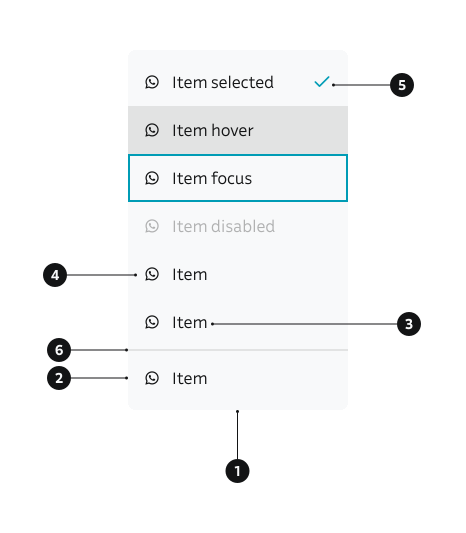
- Menu (surface) – The floating container rendered by the
Menucomponent, positioned relative to the trigger (rootElement). - MenuItem – An individual interactive row inside the menu, representing an action or selectable option.
- MenuItem label – The primary text content of a
MenuItem, describing the action or option. - MenuItem icon (optional) – An optional leading icon inside a
MenuItem, used to support recognition or categorization. - Selected state – Visual indication applied to a
MenuItemwhen it represents the current value in selection-based menus. - MenuSeparator (optional) – A visual divider rendered with
MenuSeparatorto group related menu items.
NOTE! Selection groups (e.g. radio or checkbox) can be rendered inside the menu to support single-select or multi-select patterns in structured menus.
Key MenuItem props
Use the following props to configure the MenuItem component.
icon
Optional icon element displayed before the menu item label.
| Type | Example | Description |
|---|---|---|
ReactElement | null | Icon component to display before the label |
Code example
import { MenuItem } from '@yleisradio/yds-components-react';
import { Share } from '@yleisradio/yds-icons-react';

<MenuItem icon={<Share />}>Share</MenuItem>
iconHighlight
Whether to highlight the icon area when the item is selected. Used to create space for a checkmark icon when isSelected is true.
| Type | Example | Description |
|---|---|---|
boolean | Highlights icon area for selected state |
Code example
<MenuItem
  iconHighlight
  isSelected
>
  Selected option
</MenuItem>
isDisabled
Whether the menu item is disabled and non-interactive.
| Type | Example | Description |
|---|---|---|
boolean | Disables the menu item |
Code example
<MenuItem isDisabled>
  Disabled option
</MenuItem>
isSelected
Whether the menu item is in a selected state. Used for selection-based menus (e.g., DropdownMenu).
| Type | Example | Description |
|---|---|---|
boolean | Indicates selected state |
Code example
<MenuItem isSelected>
  Selected option
</MenuItem>
itemVariant
Visual variant of the menu item. Determines how the item is rendered.
| Value | Example | Description |
|---|---|---|
default | Default variant with icon and label | |
radio | Radio button style for single selection | |
checkbox | Checkbox style for multiple selection |
Code example
<MenuItem itemVariant="default" icon={<Share />}>
  Default item
</MenuItem>
<MenuItem itemVariant="radio" isSelected>
  Radio item
</MenuItem>
<MenuItem itemVariant="checkbox" isSelected>
  Checkbox item
</MenuItem>
children
The label text or content displayed in the menu item.
| Type | Example | Description |
|---|---|---|
React.ReactNode | Content to display in the menu item |
Code example
<MenuItem onSelect={() => {}}>
  Simple text label
</MenuItem>
<MenuItem onSelect={() => {}}>
  <span>Custom content</span>
</MenuItem>
Behavior
- Menu is rendered and positioned relative to its rootElement (typically a trigger button).
- By default, the menu opens below the trigger and aligns according to the align prop (right by default).
- The menu automatically adjusts its position to avoid being clipped by the viewport.
- Keyboard interaction:
- Arrow keys move focus between menu items.
- Enter or Space activates the focused item.
- Escape closes the menu via the close callback.
- Tabbing away closes the menu via navigateAway.
- Focus management: When autofocus is enabled, focus moves to the first menu item on open. When the menu closes, focus should return to the trigger (handled by the parent component).
- The menu is only visible when a valid rootElement is provided.
Accessibility
Menu itself is a structural component. Accessibility is ensured through the patterns that use it (such as ActionMenu and DropdownMenu), but Menu enables those patterns by supporting correct focus and keyboard behavior.
- All interactions are fully keyboard accessible.
(WCAG 2.1.1 — Keyboard) - Interactive items show a clear visual focus indicator.
(WCAG 2.4.7 — Focus Visible) - Focus is managed predictably when the menu opens and closes.
- Parent components are responsible for applying correct ARIA roles and relationships (e.g. menu/menuitem, listbox/option, radiogroup/radio).
- Menu supports use inside complex contexts such as modals without allowing focus to escape unintentionally.
Implementation Examples
Custom Menu with checkboxes
Menu supporting multiple selection with checkboxes.
Code example
import { useRef, useState } from 'react';
import {
  Menu as YDSMenu,
  MenuContext,
  Button,
  MenuItem,
  MenuSeparator,
} from '@yleisradio/yds-components-react';
import { ChevronDown } from '@yleisradio/yds-icons-react';

export const MenuCheckbox = () => {
  const menuButtonRef = useRef(null);
  const [menuRoot, setMenuRoot] = useState<HTMLElement | null>(null);
  const [selectedItems, setSelectedItems] = useState<string[]>([]);

  const toggleItem = (item: string) => {
    if (selectedItems.includes(item)) {
      setSelectedItems(selectedItems.filter((i) => i !== item));
    } else {
      setSelectedItems([...selectedItems, item]);
    }
  };

  return (
    <>
      <Button
        ref={menuButtonRef}
        variant="text"
        removePadding
        iconAfter={<ChevronDown />}
        onClick={() => {
          if (menuRoot) {
            setMenuRoot(null);
          } else {
            setMenuRoot(menuButtonRef.current);
          }
        }}
      >
        Menu
      </Button>
      <MenuContext.Provider value={{ menuSize: 'md' }}>
        <YDSMenu id="menu-checkbox" rootElement={menuRoot} buttonRef={menuButtonRef}>
          <MenuItem
            itemVariant="checkbox"
            role="menuitemcheckbox"
            onSelect={() => toggleItem('Option 1')}
            isSelected={selectedItems.includes('Option 1')}
          >
            Option 1
          </MenuItem>
          <MenuItem
            itemVariant="checkbox"
            role="menuitemcheckbox"
            onSelect={() => toggleItem('Option 2')}
            isSelected={selectedItems.includes('Option 2')}
          >
            Option 2
          </MenuItem>
          <MenuSeparator />
          <MenuItem
            itemVariant="checkbox"
            role="menuitemcheckbox"
            onSelect={() => toggleItem('Option 3')}
            isSelected={selectedItems.includes('Option 3')}
          >
            Option 3
          </MenuItem>
        </YDSMenu>
      </MenuContext.Provider>
    </>
  );
};
Custom Menu with radio buttons
Menu supporting single selection with radio buttons.
Code example
import { useRef, useState } from 'react';
import {
  Menu as YDSMenu,
  MenuContext,
  Button,
  MenuItem,
  MenuSeparator,
} from '@yleisradio/yds-components-react';
import { ChevronDown } from '@yleisradio/yds-icons-react';

export const MenuRadio = () => {
  const menuButtonRef = useRef(null);
  const [menuRoot, setMenuRoot] = useState<HTMLElement | null>(null);
  const [selectedItem, setSelectedItem] = useState('Option 1');

  return (
    <>
      <Button
        ref={menuButtonRef}
        variant="text"
        removePadding
        iconAfter={<ChevronDown />}
        onClick={() => {
          if (menuRoot) {
            setMenuRoot(null);
          } else {
            setMenuRoot(menuButtonRef.current);
          }
        }}
      >
        Menu
      </Button>
      <MenuContext.Provider value={{ menuSize: 'md' }}>
        <YDSMenu id="menu-radio" rootElement={menuRoot} buttonRef={menuButtonRef}>
          <MenuItem
            itemVariant="radio"
            role="menuitemradio"
            onSelect={() => setSelectedItem('Option 1')}
            isSelected={selectedItem === 'Option 1'}
          >
            Option 1
          </MenuItem>
          <MenuItem
            itemVariant="radio"
            role="menuitemradio"
            onSelect={() => setSelectedItem('Option 2')}
            isSelected={selectedItem === 'Option 2'}
          >
            Option 2
          </MenuItem>
          <MenuSeparator />
          <MenuItem
            itemVariant="radio"
            role="menuitemradio"
            onSelect={() => setSelectedItem('Option 3')}
            isSelected={selectedItem === 'Option 3'}
          >
            Option 3
          </MenuItem>
        </YDSMenu>
      </MenuContext.Provider>
    </>
  );
};
API Reference
Props
The Menu component accepts the following props:
| Prop | Type | Required | Default | Description |
|---|---|---|---|---|
id | string | Yes | — | Unique identifier for the menu |
rootElement | HTMLElement | null | Yes | — | Element to position menu relative to |
autofocus | boolean | Yes | — | Whether to focus first item on open |
close | () => void | Yes | — | Callback to close the menu |
buttonRef | RefObject<HTMLButtonElement> | Yes | — | Reference to trigger button |
navigateAway | () => void | Yes | — | Callback when navigating away |
align | 'left' | 'right' | No | 'right' | Horizontal alignment of menu |
children | React.ReactNode | Yes | — | Menu items to display |
Type Definitions
export interface MenuProps {
  id: string;
  rootElement: HTMLElement | null;
  autofocus: boolean;
  close: () => void;
  buttonRef: RefObject<HTMLButtonElement>;
  navigateAway: () => void;
  align?: 'left' | 'right';
  children: ReactNode;
}

export const Menu = forwardRef<HTMLUListElement, MenuProps>;
MenuContext
The Menu component uses MenuContext to access menu configuration:
export interface MenuInterface {
  closeMenu?: () => void;
  menuSize: MenuSize;
}

export const MenuContext = createContext<MenuInterface>({ menuSize: 'md' });
Menu items can access the context to:
- Get the current menu size (
mdorsm) - Access the
closeMenufunction if needed
MenuItem API Reference
Props
The MenuItem component accepts all standard HTML <li> attributes in addition to the following props:
| Prop | Type | Required | Default | Description |
|---|---|---|---|---|
icon | ReactElement | null | No | undefined | Icon element to display before the label |
iconHighlight | boolean | No | false | Whether to highlight icon area when selected |
isDisabled | boolean | No | false | Whether the menu item is disabled |
isSelected | boolean | No | false | Whether the menu item is selected |
itemVariant | 'default' | 'radio' | 'checkbox' | No | 'default' | Visual variant of the menu item |
onSelect | () => void | No | — | Callback fired when item is selected |
closeMenuOnClick | boolean | No | true | Whether to close menu when item is selected |
role | string | No | 'menuitem' | ARIA role for the menu item |
children | React.ReactNode | Yes | — | Label text or content to display |
Type Definitions
export interface MenuItemDSProps {
  icon?: ReactElement | null;
  iconHighlight?: boolean;
  isDisabled?: boolean;
  isSelected?: boolean;
  closeMenuOnClick?: boolean;
  onSelect?: () => void;
  role?: string;
  children: ReactNode;
  itemVariant?: 'default' | 'radio' | 'checkbox';
}

export type MenuItemProps = MenuItemDSProps & HTMLAttributes<HTMLLIElement>;
MenuSeparator
MenuSeparator is a simple component used to visually separate menu items:
export const MenuSeparator = (): JSX.Element;
Code example
import { MenuItem, MenuSeparator } from '@yleisradio/yds-components-react';

<MenuItem onSelect={() => {}}>Option 1</MenuItem>
<MenuItem onSelect={() => {}}>Option 2</MenuItem>
<MenuSeparator />
<MenuItem onSelect={() => {}}>Option 3</MenuItem>
Related Components
- ActionMenu – Uses Menu internally for action-based menus
- DropdownMenu – Uses Menu internally for selection-based menus
- DropdownMenuGroup – Uses Menu internally for grouping multiple dropdown menus into a unified control area.
- ComboboxSingleSelect uses Menu internally for the dropdown menu.